
Inspecting and detecting tampering with payment terminals is crucial for maintaining the security of transactions and protecting both the customers and Magic Memories. By conducting regular physical and visual inspections of payment terminals at the beginning of each shift, employees can help ensure that the devices have not been tampered with and are functioning properly, thereby reducing the risk of fraud and other security breaches.
 Checklist
Check for signs of forced entry
Look for any signs that the terminal has been forcibly opened or pried open. This could include scratches, dents, or other damage around the edges of the device.
Check the card slot
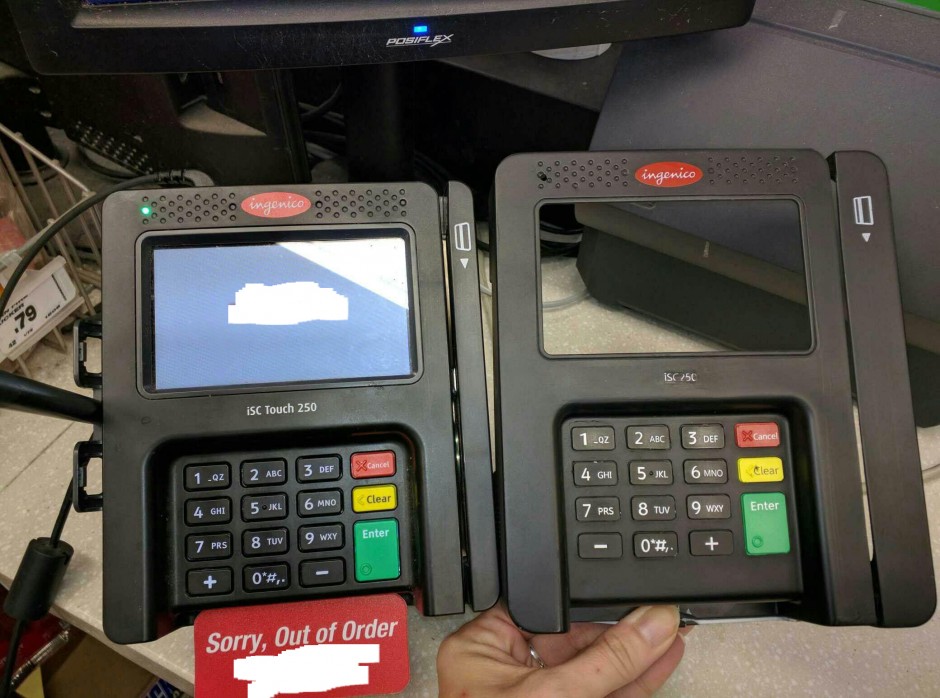
Look for any signs of tampering around the card slot, such as scratches or marks that indicate a device may have been attached or removed. Check to see if the slot feels loose or if it has been modified in any way.
Inspect the card reader
Check the card reader for any skimming devices that may have been placed over the original reader. Look for any unusual or unfamiliar devices that may have been attached to the reader.
Inspect the power supply
Check the power supply for any signs of tampering, such as wires that have been cut or spliced. Look for any unusual or unfamiliar devices that may be attached to the power supply.
Inspect the keypad (if applicable)
Check the keypad for any signs of tampering, such as loose keys, keypads that are raised or tilted, or keys that do not feel like they are functioning properly. Look for any overlays or skimming devices that may have been placed over the original keypad.
Check the receipt printer (if applicable)
Check the receipt printer for any signs of tampering, such as a missing or broken cover. Look for any unusual or unfamiliar devices that may be attached to the printer.
Check for hidden cameras
Look for any small cameras that may have been placed near the terminal. Check for any unusual or unfamiliar wires or devices that may be attached to the terminal.
Comments
0 comments
Please sign in to leave a comment.